
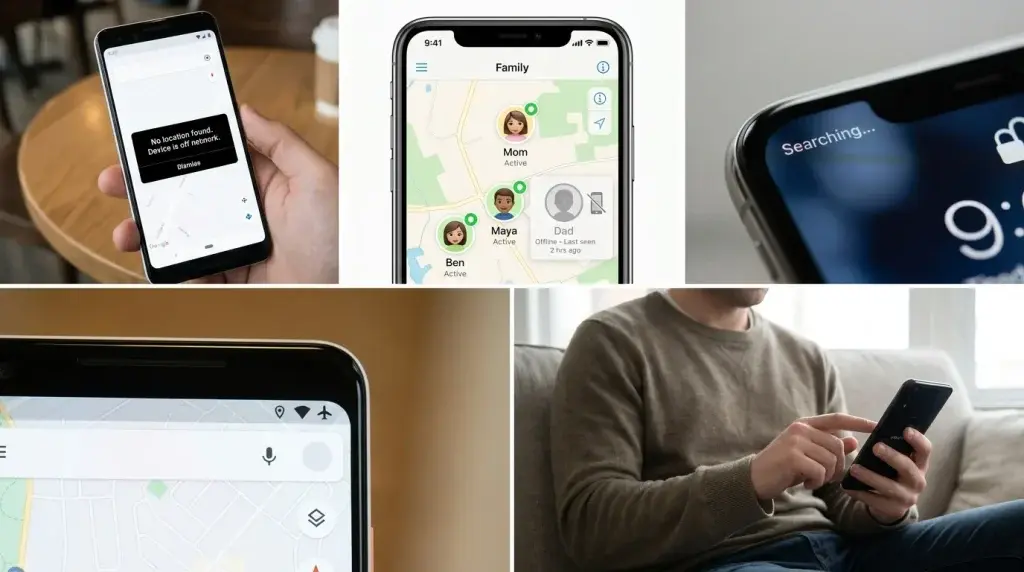
If you have ever tried to check on a friend’s location and saw the words “no location found off network,” you probably felt confused. This message shows up on phones and location-sharing apps.
Off network location meaning the device you are trying to find cannot connect to the network right now. Because of that, the app cannot get an updated location for it.
This mix-up happens more often than people think. It is not a sign that something is broken forever. Most of the time, it is just a short connection problem.
In this guide, you will learn what the message means, why it happens, and simple steps to fix it. You will also see the difference between this and other similar location errors.
Quick Answer
“No location found off network” means a device cannot share its location because it is not connected to the internet, GPS, or cell service at that moment. This error commonly appears on smartphones and location-based services when a device cannot connect properly to mobile data, Wi-Fi, GPS, or cloud-based location systems. Once the device reconnects to a network, the location should update again on its own.
This is different from a message that says location sharing was turned off on purpose. Location off network meaning is almost always about a temporary connection gap, not a setting someone changed.
What Does “No Location Found Off Network” Mean?
Let’s break this phrase into smaller pieces so it makes more sense.
“No location found” means the app tried to get a location and could not find one. “Off network” tells you why. The device is not connected to a network that can send location data.
The message typically appears when a device temporarily cannot provide accurate location information because it is disconnected from required network services. Think of it like trying to call a friend who has no phone signal. You are not doing anything wrong. The connection just is not there right now.
Location-sharing systems often rely on GPS, mobile data, Wi-Fi connections, Bluetooth signals, and cloud synchronization. When even one of these pieces stops working, the whole system can fail to update. In simple terms, the device cannot communicate with the network needed to update its live location.
This message is common on apps like Find My iPhone, family safety apps, delivery trackers, and car GPS trackers. Any app that needs a live signal to show location can display a version of this error.
It Says “No Location Found Off Network”
If your device displays the message “No location found off network,” it usually means that the device cannot detect or access your current location while it is disconnected from the network. This issue may occur when GPS is unavailable, location services are turned off, or the device is unable to connect to Wi-Fi or mobile data. In some cases, the device may need an active internet connection to identify its location accurately.
To fix this issue, check if your location services are enabled, make sure your internet connection is working, and restart your device if necessary. You can also check the app’s location permissions to ensure it has access to your location.
If the issue continues, try connecting to another network or updating the app. These steps may help restore location detection and resolve the “No location found off network” message.
Why Does This Error Happen?
There are a few common reasons a device goes “off network.” Most of them are simple and easy to understand once you see them listed out.
Weak or missing internet connection
This is one of the most common causes. If the device loses mobile signal, disconnects from Wi-Fi, enters airplane mode, or has limited data access, location services may stop updating properly. A phone needs some type of internet connection, either Wi-Fi or mobile data, to send its location to another device.
GPS problems
Sometimes the internet is fine, but GPS itself is having trouble. GPS functionality may fail temporarily because of software bugs, low signal areas, indoor environments, or disabled location services. Being inside a large building, parking garage, or basement can block GPS signals completely.
The device is turned off
A phone that is powered off cannot send any signal at all. This is one of the simplest explanations, and it is very common. If a person’s phone battery dies, the app will not be able to find them until it turns back on.
What does off network mean on find my?
The device is in an area with poor network coverage.
Airplane mode is on
Airplane mode does not completely turn off location services, but it cuts off all network connections, which are essential for apps like Find My to work. A friend or family member’s phone may still know its own location, but it cannot send that information to your phone until airplane mode is off.
Outdated software or app bugs
An outdated version of a phone’s operating system can also cause this issue, since older versions might have bugs that disrupt an app’s ability to access and share location data. Updating the phone often clears up the problem.
Signed out of an account
If a person has signed out of their cloud account, their device disconnects from the location-sharing network entirely, which stops the app from tracking or updating its location. This is easy to miss because nothing on the screen looks obviously wrong.
Permission or setting issues
Sometimes a device has internet access, but the specific app does not have permission to use location. In this case, the network is fine, but the app still cannot get the data it needs.
Here is a simple table that sums up the most common causes and how serious they usually are.
| Cause | How Common It Is | Usually Easy to Fix? |
| Weak Wi-Fi or mobile data | Very common | Yes |
| Phone powered off | Very common | Yes, once it turns back on |
| Airplane mode enabled | Common | Yes |
| GPS blocked indoors | Common | Yes |
| Outdated app or software | Somewhat common | Yes, with an update |
| Signed out of account | Less common | Yes, sign back in |
| Location permissions disabled | Less common | Yes, in settings |
How to Fix “No Location Found Off Network”
Now that you know the common causes, let’s go through simple ways to fix each one. You do not need to be a tech expert to try these steps.
First, check your own internet connection. Sometimes the problem is not the other person’s phone at all. It is your own Wi-Fi or data connection. Try opening a website or another app to see if your internet is working.
Second, wait a few minutes and refresh the app. Many location apps update every few minutes, not instantly. A quick refresh or closing and reopening the app can solve the issue right away.
Third, ask the other person to check their settings if you can reach them another way, like a text message or phone call. Simple checks like turning off airplane mode or turning on Wi-Fi can fix things fast.
Fourth, restart the device. A restart clears out small software hiccups that might be blocking the GPS or network connection.
Fifth, update the app and the phone’s operating system. Updating to the latest version usually fixes bugs that disrupt location sharing.
Sixth, check location permissions in the phone settings. Make sure the app has permission to use location “always” or “while using the app,” depending on what is needed.
Seventh, sign back into the cloud account if it looks like the person has been signed out. This reconnects the device to the location network.
Common Mistakes People Make
A lot of people jump to conclusions when they see this message. Here are a few mistakes worth avoiding.
One mistake is assuming the person turned off location sharing on purpose. In most cases, this message is about a connection problem, not a choice. Often it just means that there is no proper network coverage, even when nothing was changed on purpose.
Another mistake is panicking right away. Since most causes are simple, like a dead battery or a weak signal, it is worth waiting a short time before assuming something is seriously wrong.
A third mistake is only checking the other person’s device and never checking your own connection. Sometimes your phone is the one having trouble getting updates, not theirs.
A fourth mistake is ignoring app updates. Skipping updates for a long time can lead to more bugs, including location errors that could have been avoided.
Real-Life Examples
Here are a few everyday situations where this message shows up.
Imagine a parent checking on a teenager’s phone using a family location app. The teen walks into a movie theater with thick walls that block GPS and cell signals. The parent sees “no location found off network” until the teen walks back outside.
Another example is a delivery driver whose phone battery dies during a long shift. The tracking app used by the delivery company shows the same kind of error until the driver charges the phone and it reconnects.
A third example is someone flying on a plane. Once they turn on airplane mode, their location stops updating for friends or family watching a shared location map, right up until they land and turn airplane mode off again.
Current Usage and Trends
Location-sharing apps have become part of daily life for families, friend groups, and delivery services. As more people rely on these features, questions about location errors have grown too.
Many phone makers and app developers are working to make location updates more reliable, even in weak signal areas. Some newer phones use a mix of GPS, Wi-Fi, and Bluetooth to guess a location even when one system fails. Still, it says no location found off network system , and messages like “no location found off network” will likely keep showing up whenever a device truly has no way to connect.
Here is a table comparing how this error tends to behave on the two most common phone types.
| Phone Type | Common Cause | Typical Fix |
| iPhone (Find My app) | Device offline, airplane mode, or dying battery | Reconnect to Wi-Fi or data, charge phone |
| Android (location sharing apps) | Weak GPS signal or disabled location services | Enable location services, move to open area |
Tips to Prevent This Error in the Future
A few simple habits can lower how often you see this message.
Keep your phone’s software and apps updated on a regular basis. Turn on automatic updates if that option is available. Keep your battery charged, especially before long trips or busy days. Turn on Wi-Fi calling or make sure mobile data stays on when traveling through areas with weak signal. Check your location settings once in a while to be sure permissions have not changed by accident.
These small steps will not stop every location error, but they will make them far less common.
FAQs
What does off network mean on location?
What does off network mean when looking at someone’s location? It almost always points to a connection problem, like weak signal, a dead battery, or airplane mode being turned on.
How long does this error usually last?
It depends on the cause. If the phone reconnects to Wi-Fi or data within a few minutes, the location should update quickly. If the phone is off or the battery is dead, it can last much longer.
Can bad weather cause this error?
Storms can sometimes weaken cell signals in certain areas, which may lead to slower or failed location updates. It is not the main cause, but it can play a small role.
Is this the same as “location not available”?
The messages are similar, but “no location found off network meaning” points more directly to a off network meaning connection issue, while other messages can point to permission or hardware problems.
Should I be worried if I keep seeing this message often?
Not usually. If it happens a lot with the same device, it may be worth checking that device’s settings, battery health, or software updates.
Can I fix this error from my own phone if it is someone else’s device?
Not directly, since the fix has to happen on the other device. You can only try refreshing the app, checking your own connection, or reaching out to that person another way.
Conclusion
Seeing “no location found off network” can feel worrying at first, but it almost always has a simple explanation. This message usually points to a connectivity or availability issue rather than a permanent device problem.
If it is a weak signal, a dead battery, airplane mode, or an app that needs an update, most causes are easy to understand and even easier to fix.
The next time this message pops up, take a breath before jumping to conclusions. Check your own connection first, give it a few minutes, and try a simple fix like restarting the app or device. In most cases, the location will update again as soon as the device reconnects to the network it needs.

Hi, I’m Elias Monroe. I enjoy writing meaningful prayer content that helps people feel calm, hopeful, and spiritually strong. My goal is to share words that bring comfort during both joyful and difficult times.






1 thought on “What Does “No Location Found Off Network” Mean?<p class="post-updated-date">🕓 <span class="updated-label">Last updated on</span> <time datetime="2026-11-01T17:54:01+00:00">November 1, 2026</time></p><script type="application/ld+json"> { "@context": "https://schema.org", "@type": "BlogPosting", "mainEntityOfPage": { "@type": "WebPage", "@id": "https://prayyeralert.com/no-location-found-off-network-meaning/" }, "datePublished": "2026-10-05T03:22:05+00:00", "dateModified": "2026-11-01T17:54:01+00:00" } </script>”